




Type a word into Google and you get a list of pages. Type the right operators and you get a filtered, targeted, repeatable query that answers a specific question — and, run against a domain you own, tells you exactly what the public internet can already see. Every example on this page is a live link. Click it, watch the syntax work, then change the domain to your own.
The technique has a name: Google dorks. A dork is an advanced search query built from operators that narrow a search to a specific host, file type, phrase, date range or word combination. Search engine pioneer Johnny Long popularised the term in 2002 with a paper called “Google Hacking”, and two decades later it is still the first tool a penetration tester opens and the last one a small business forgets to check.
Why does it matter? Because a search engine is an indexer, and an indexer is a recorder. Anything that was briefly reachable on a web server — a config file, a backup archive, a staging page — can be sitting in a search index long after somebody noticed and “took it down.” The file is gone from the server and still sitting in Google.
Searching is legal. Using what you find is not, unless you are authorized. Running these queries against a domain you own, or one you have written permission to test, is standard, responsible security work. Signing in with credentials you discovered, pulling a database dump you were not handed, or getting past a paywall or a login page is a different activity with different consequences.
Everything in the audit section below is scoped to example.com for exactly that reason. Replace it with your own domain and nowhere else. This guide is for finding your own holes and closing them.
What Google Dorks Actually Do
Google spends a disproportionate amount of its capacity reading pages most people never visit: the fourth result page, the archived copy, the file somebody uploaded and forgot. A dork is how you address that corpus deliberately. Rather than hoping a keyword surfaces the thing you want, you state the conditions — this host, this file type, this phrase, this date — and let the index do the walking.
That makes dorking a form of passive reconnaissance. You never touch the target. You read what a third party already published, which is why it is fast, free, leaves no trace in the target’s logs, and is something any business can run against itself without hiring anyone.
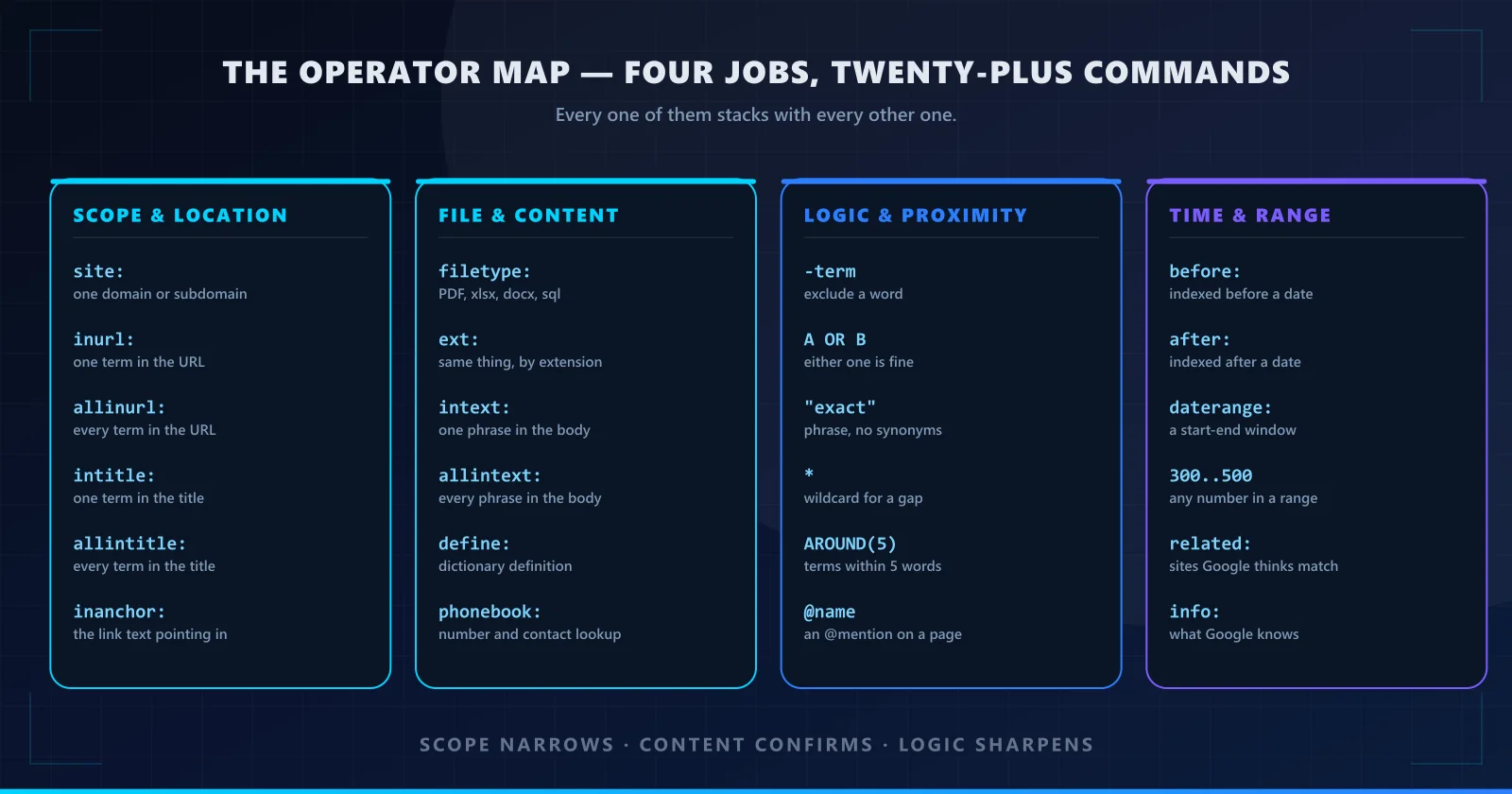
The Operator Reference
Here is the full set. Each row carries a runnable example: click the query and it opens a live Google search so you can see the syntax produce real results instead of taking our word for it. The examples use public, harmless targets — swap in your own domain where it makes sense to you.
| Operator | What it does | Runnable example |
|---|---|---|
| site: | Confines every other term in the query to one domain or subdomain. The single most useful operator there is, and the one to reach for first. | site:nytimes.com intitle:ransomwarerun |
| inurl: | Requires one term to appear somewhere in the page URL. Good for finding a section of a site you already know exists. | inurl:careers data analystrun |
| allinurl: | Requires every term you list to appear in the URL. Use inurl: for one needle; allinurl: when all of them must be present. | allinurl:jobs applyrun |
| intitle: | Requires one term in the page title. Titles are the highest-signal text on a page, which makes this the cheapest way to cut a result set down. | intitle:"incident response plan"run |
| allintitle: | Requires every listed term in the title. This is the operator that turns a thousand results into a dozen relevant ones. | allintitle:annual report 2025run |
| inanchor: | Searches the clickable text of links pointing at a page. It finds sites that have linked to a topic, which is how you map who talks about what. | inanchor:"book a repair"run |
| Operator | What it does | Runnable example |
|---|---|---|
| filetype: | Restricts results to one document type. The fastest route to the reports, spreadsheets and PDFs that a normal keyword search buries. | filetype:pdf "penetration test"run |
| ext: | Same filtering by file extension, and it also catches files with unusual or missing extensions that filetype: can miss. | ext:sql "CREATE TABLE"run |
| intext: | Requires a phrase in the visible body text of the page. This is how you find a specific string that lives inside an otherwise unremarkable document. | intext:"this document is confidential"run |
| allintext: | Requires every phrase you list to appear in the body. Combine two or three to force a very tight match. | allintext:"managed services" "New York"run |
| define: | Pulls a dictionary definition straight from the results. Useful for settling an argument about what a term means mid-investigation. | define:"phishing"run |
| phonebook: Retired by Google | Historically a contact lookup by number or business name. Google retired this operator years ago; it is still printed on cheat sheets and no longer returns results. | phonebook:"ShortCircuited Robotics"run |
| Operator | What it does | Runnable example |
|---|---|---|
| -term | A minus sign immediately before a word excludes it. There is no space between the dash and the word. This is the most-used operator after site:. | laptop repair -jobs -wholesalerun |
| OR | | Accepts either term. Google honours both the word OR and the pipe character; the pipe is easier to read inside a long query. | "managed IT" | "IT support" Brooklynrun |
| "exact phrase" | Double quotes force a literal phrase match with no synonyms substituted. If you remember the exact wording of something, always quote it. | "same day screen repair"run |
| * | A wildcard standing in for one or more missing words. A valuable trick: wildcards do not count against Google's limit, so you can use them to pad a long phrase back down under the cap. | "* * * * * security * * * *"run |
| AROUND(n) | Returns only pages where your terms sit within n words of each other. Far more precise than searching the terms separately, because it preserves the relationship between them. | ransomware AROUND(10) "city of"run |
| @name | Finds pages carrying an @mention of a specific account. Useful for tracing where a brand or person is being discussed. | @shortcircuitedrun |
| Operator | What it does | Runnable example |
|---|---|---|
| before: | Only pages Google indexed before a given date. Use it to cut a topic off at a point in time — useful for tracking when a bad practice stopped or started. | data breach before:2024-01-01run |
| after: | Only pages indexed after a given date. The mirror of before:, and the better half of the pair for finding anything recent. | zero trust after:2025-01-01run |
| daterange: | Sets both ends at once, which is cleaner than pairing before: and after: when you have a real window in mind. | daterange:2025-01-01..2025-12-31 ransomware reportrun |
| 300..500 | Two numbers separated by two dots match any value in that range. Works on prices, years, port numbers and version strings. | "support plan" $50..$150run |
| related: | Surfaces sites Google considers related to a given one. It is the fastest way to expand a competitive or research list past the obvious names. | related:securitytrails.comrun |
| info: | Returns what Google itself has recorded about a site. Largely intact, though several of its old sub-filters have been retired over the years. | info:shortcircuited.usrun |
Two honest corrections to the classic cheat sheet. Most of the widely circulated dork lists still carry cache:, which returned a stored copy of a page — Google removed that operator in 2024, and it no longer works. phonebook: and map: had already been discontinued before that. We have left them out of the table above rather than handing you syntax that quietly returns nothing. If a tutorial tells you to run cache: to recover a page that has gone down, it was written a long time ago.
How to Combine Operators
A single operator narrows. Two or three stacked together — this is where dorking stops being a trick and becomes a method. Operators are simply joined with spaces and they all apply at once. Start with site: to set the boundary, add filetype: or intext: to confirm what you are actually looking for, then finish with a date bound or an exclusion to trim the edges.
site:example.com filetype:pdfrunThe canonical first move. A surprising share of sites expose documents they never linked from a public page.
site:example.com intext:"support hours"runTells you whether a support page, an old post or a PDF is contradicting your current hours.
site:example.comrunBoring but essential. It is the only reliable inventory of what the search engine actually knows about you, including pages you have since unlinked.
site:example.com filetype:xlsx after:2024-01-01runContent plus a date bound. Spreadsheets are where budgets, headcount and customer lists quietly end up.
site:example.com -site:staging.example.comrunStaging and development copies are indexed constantly, are rarely checked, and very often run older, less patched code.
link:example.com/page "review"runShows who is pointing at you, which is a free backlink list and a free map of your mentions.
The minus sign takes no space. It has to sit directly against the word: -wholesale, never - wholesale. The spaced version is searched for as a literal term.
Quotes are only useful on phrases. "managed IT" forces a literal match; quoting a single common word narrows nothing except your own results.
Google has a 32-word limit on a query. Long stacked dorks do not get truncated, they just stop working well. The wildcard trick below is the escape hatch.
The Ten-Minute Self-Audit
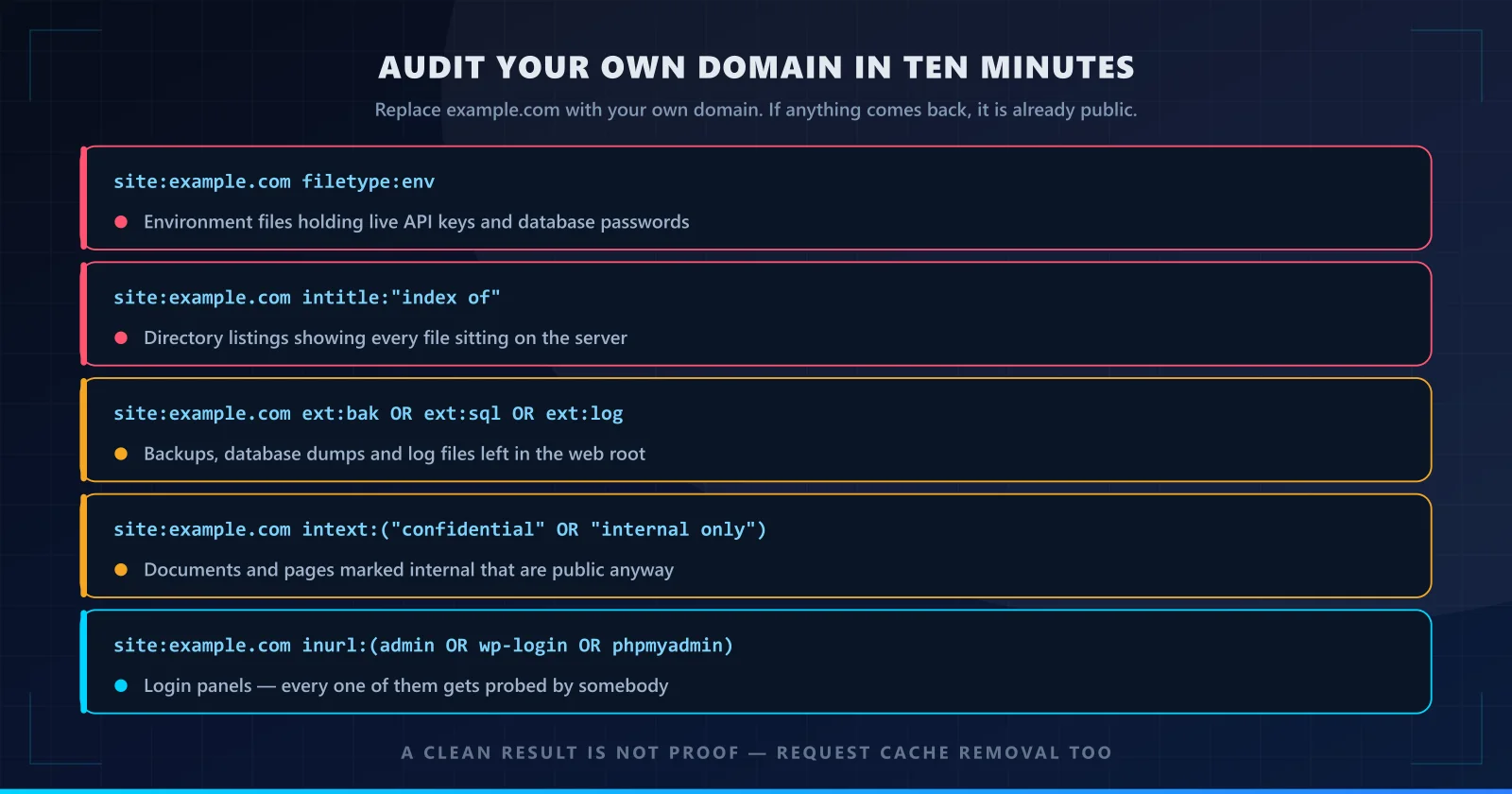
This is the part that pays for the article. Five searches, about ten minutes, zero software, and they tell you what an outsider can find about your own property without touching it. Run them against your own domain only — replace example.com with the real thing.
- Run the search
What it finds: Environment files holding live API keys, database passwords and service tokens. This is the single highest-value search on the list, because a .env file is designed to be excluded from source control and then forgotten on a web server.
What to do: If anything comes back, rotate every credential in it today. Deleting the file does not un-leak the keys — assume they are already indexed and treat them as burned.
- Run the search
What it finds: Directory listings. When a folder has no index page and the web server is configured to generate a listing, the URL becomes a browsable index of every file in it — backups, drafts, half-finished work.
What to do: Set the server to refuse directory listings (the Apache directive is Options -Indexes) rather than relying on there being nothing interesting in the folder.
- Run the search
What it finds: Backup archives, database dumps and log files left sitting in the web root. A .sql dump is a complete copy of your data, and a .log often contains session tokens and internal addresses.
What to do: Move backups off the web root entirely, keep them on storage that is not publicly addressable, and delete the old copies rather than renaming them.
- Run the search
What it finds: Pages and documents that are marked internal or confidential and are nonetheless public. Nobody has to guess which of your documents are sensitive if you labelled them yourself.
What to do: Search your own document titles and internal wording, then move anything that should not be public behind a login — or off the web entirely.
- Run the search
What it finds: Every login panel and admin path on the property. There is nothing exotic about this one; automated scanners look for exactly these paths millions of times a day, and each panel you expose is one more password-spray target.
What to do: Rename the default paths where the software allows it, require multi-factor authentication, put the panel behind a VPN or allowlist, and turn off username enumeration.
A hit is already public. If Google returns it, it is indexed, and treating it as a maybe-to-be-exposed later is how credential leaks turn into incidents. Rotate first, clean up second.
A clean result is not proof of safety. The index lags, and a file can be reachable but not yet crawled. Pair the audit with a direct request for each sensitive path, and re-run it after every deployment that touches the file layout.
Hardening: Closing What You Just Found
Finding the hole is the easy half. These are the fixes, in the order that actually matters.
1. Stop serving the file. That is the fix.
Every other measure on this list is secondary. A secret that was never on a publicly addressable URL was never leaked, no matter what the search engine does with it. Move .envfiles, database dumps, backups and logs off the web root into storage that requires authentication, and keep them out of version control. If a credential has ever been reachable, rotate it — deleting the file does not un-publish the key.
2. Turn off directory indexing
If a folder has no index page, some web servers will generate a browsable listing of everything inside it. On Apache, one line disables that for the whole site:
Options -IndexesThe directory then returns a 403 instead of a file list. This is not a substitute for the files being properly placed — it just removes the shopping catalogue.
3. Use robots.txt as a crawler hint, not a lock
A robots.txt file at the root of the domain asks compliant crawlers to skip paths. That reduces what gets indexed and, in practice, removes a lot of accidental discovery. It is worth having:
# Sensitive directories
User-agent: *
Disallow: /admin/
Disallow: /config/
Disallow: /backup/
Disallow: /private/

# File types that should never be indexed
Disallow: /*.sql$
Disallow: /*.log$
Disallow: /*.bak$
Disallow: /*.env$robots.txt is a request, not a control. It does not stop anyone from requesting the file — only a courteous crawler obeys it. Worse, writing Disallow: /admin/ into the file advertises that /admin/ exists and is worth a look. For a path that is genuinely secret, robots.txt makes it easier to find, not harder.
Use it to keep things out of search results. Never use it as the reason something is safe.
4. Harden the login surface
Every admin panel, mail server control panel and database manager is discovered automatically and probed constantly. Give each one multi-factor authentication, disable username enumeration so a wrong login cannot tell you which half was wrong, and where the software allows it, put the panel behind a VPN or an IP allowlist instead of leaving it reachable from the open internet.
5. Quiet the error pages and patch everything
A detailed stack trace is a map. Verbose error pages leak framework versions, file paths, database table names and occasionally connection strings, and search operators like inurl:error or intext:"SQL syntax"are good at finding them. Serve a generic error to the user and log the detail server-side. Then keep the software, the CMS and its plugins current — an unpatched WordPress install is the single most common thing a dork turns up in the wild.
6. Put a WAF in front of the site
A web application firewall will not stop a determined attacker, but it absorbs the automated traffic that makes up the overwhelming majority of hits against a small business site, and it gives you a log of what was tried. For a shop or a practice site that is not staffed 24/7, that visibility is worth the subscription on its own.
Legitimate Everyday Uses
None of this is only for defenders. The same operators that find an exposed backup file also do ordinary research, better and faster than clicking through menus.
- Research and fact-finding.
filetype:pdfplus a topic finds primary source reports, standards documents and filings that general search buries under commentary.define:settles terminology without leaving the results page. - Finding a specific person’s public work.
site:plus a company domain gives you that person’s published output in one query. Combined withinurl:andintitle:it is how background research and due diligence get done. - SEO and competitive analysis.
related:expands a competitor list.site:competitor.com -brandfinds the pages they rank for that you do not.allintitle:andinurl:expose how a site is structured and where its keyword coverage has gaps. - Knowing what is public about you. The same self-audit above is genuinely the most useful research most people never run: a search for your own name, your domain and your phone number tells you your real digital footprint, including the parts you would rather not explain.
Common Mistakes
- Forgetting the space after the colon.
site:example.comwith a space becomes a search for the literal words “site example.com.” - Spacing the minus sign.
- wholesaleis a search term.-wholesaleis an exclusion. - Mixing uppercase and lowercase. Google lowercases
AND,OR,NOTandsite:, but you should not rely on it — type them lowercase. - Using AND explicitly. Plain spaces are already an AND. Writing
foo AND barsearches for the word “and.” - Stacking ten operators and expecting precision. You get an empty result set. Build up from
site:one operator at a time. - Trusting robots.txt as protection. Covered above, and it is the most consequential of the six.
Frequently Asked
Are Google dorks legal?
Using search operators is legal. Running them against a domain you own or have written permission to test is standard security practice, and it is how most penetration test reports begin. Using what you find is the line: signing in with exposed credentials, downloading a dump you were not given, or getting past a paywall or a login page.
What is the single most useful dork?
site:— the domain restriction operator. It scopes an entire query to one domain, and every other technique here builds on it. For defensive work, site:example.com filetype:env is the single highest-value combination, because it checks for exposed environment files on your own property in one query.
Can a dork find my passwords or private keys?
A dork only finds what a search engine has already indexed. It breaks nothing and grants no access by itself. But a file that was briefly reachable can leave a credential sitting in an index long after the file is gone — which is exactly why a hit means rotate the credential immediately rather than just deleting the file.
Does robots.txt actually protect my files?
No. It is a request, not a control. It asks compliant crawlers to skip a path, it does not stop anyone from requesting the file, and naming a sensitive path in it can advertise that the path exists. Use it to reduce indexing; never use it as the reason something is safe.
Why do some operators on old cheat sheets not work?
Google retires operators. cache:— which returned a stored copy of a page — was removed in 2024. phonebook: and map: had already gone before that. They survive in copied cheat sheets, including the one this guide is built from, which is why we mark the retired ones instead of handing you syntax that quietly returns nothing.
How often should I run the audit?
Monthly for a site that does not change much, and immediately after any deployment that adds a subdomain, publishes a new document type, or moves files around. Indexing lag is real, so a file can be live and searchable before you know it is there. Quarterly at minimum for a mostly static site.
This guide builds on the operator reference and defensive section of Recorded Future’s threat intelligence primer, “Google Dorks: Top Tips and Tricks for Advanced Search Intelligence”, with the retired operators corrected and a self-audit playbook added. Read the original.
We Accept Donations
Send your crypto donations to Maxiaxxx.sol. All funds help towards moving our site to decentralized.