




Most Brooklyn small businesses run on a network nobody designed: an ISP modem under the counter, one Wi-Fi password taped to the register, guest laptops on the same lane as the payment terminal and the quickbooks drive. It works — until an AI-driven attack lands on it, and then everything is in the blast radius at once.
We’re ShortCircuited Robotics, a computer repair and networking shop at 1339 Lincoln Place, Brooklyn NY 11213. We design, install, and maintain secure business networks for offices, clinics, retail stores, and studios across the borough — flat-rate, in plain English, with the same gear we’d put in our own shop. Here’s exactly what that includes, so you can compare us to anyone.
What a Proper Business Network Installation Includes
1. Site survey and network design
Before anything is bought, we walk the space: where the internet enters, where staff sit, where the register and cameras run, where signal dies. You get a simple map of what we’ll build and why — and a flat-rate quote, not an hourly meter.
2. Structured cabling
Clean Cat6 runs to every desk, register, access point, and camera — labeled, tested, and certified. Wires stapled along baseboards die slow deaths and cause most “the internet is random” calls we get. Retrofitting cabling after a breach costs multiples of doing it right the first time.
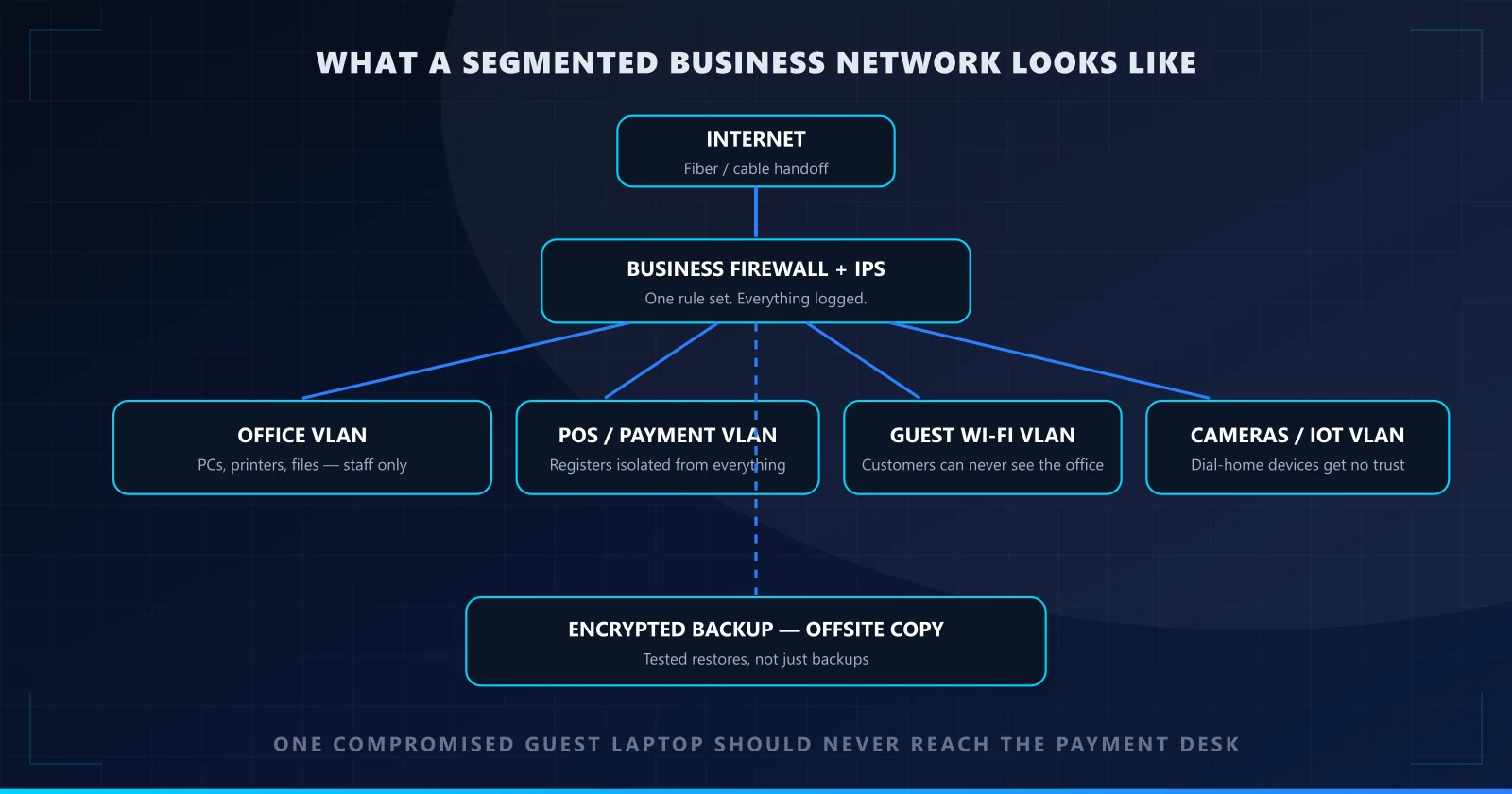
3. Business-grade firewall with intrusion prevention
The single most important box in the building. A business firewall with IPS blocks automated scans and exploit attempts before they find a foothold, logs everything for after-the-fact answers, and gives you one place to control what leaves the network. The ISP’s free combo box does none of this — that’s true in 2026 and it was true in 2006.
4. VLAN segmentation — the upgrade most owners have never heard of
One physical network, split into isolated lanes:office computers, payment terminals, guest Wi-Fi, cameras and smart devices. A hacked guest laptop can’t reach the register. A camera phoning home to some vendor’s cloud can’t see your files. Ransomware that lands on a desk can’t reach the bookkeeping drive. Segmentation turns one catastrophe into one bad afternoon, and it’s standard in every install we do — not an upsell.
5. Enterprise Wi-Fi that actually reaches
Properly placed access points, isolated guest networks with their own password, roaming that works, and a network that doesn’t fall over when Friday gets busy. Mesh gadgets from a big-box store are fine for an apartment; they’re a liability fronting a business.
6. Backup that gets tested, not just bought
Encrypted local backup plus an offsite copy — the 3-2-1 rule — and here’s the part that matters: we run test restores. An untested backup is a hope. When ransomware hits, the difference between a bad week and a going-out-of-business event is whether your restore actually works.
7. Power and physical basics
UPS battery backup on the gear that must not blink (firewall, server, register network), surge protection, and the network rack or wall-mount done neatly enough that the next person can service it without an archaeology degree.
Install Is Half the Job: Why Maintenance Matters
A network is not a toaster. Firewalls ship with bugs that get patched; staff come and go and their accounts should too; backups fill up; a cable gets kicked loose. An install without maintenance decays back into the same mess it replaced — it just takes a year or two.
Our flat-rate maintenance plans cover:
- Patching — firewall, switches, access points, servers, on a schedule.
- Monitoring— alerts when something drops, slows, or starts talking to somewhere it shouldn’t.
- Backup verification — monthly proof that a restore actually restores.
- Account reviews — departed staff lose every door they held, that day.
- Quarterly reviews — what changed, what to plan, what to budget. In English, on one page.
Why does this matter more every year? Because attacks are automated now — see our guide to cybersecurity in the age of agentic AI. Your defense can’t be a one-time project when the offense is a subscription.
Who We Work With
- Medical & dental offices — HIPAA-aware design: imaging isolated from the front desk, encrypted backups, audit-friendly logging, and support for Dentrix, Eaglesoft, and Open Dental. We wrote up why the FBI flags practices like yours, and we run dedicated dental IT support in Brooklyn plus new-office network packages.
- Offices & professional firms— law, accounting, real estate: client files, trust account data, and email that can’t be spoofed against your own clients.
- Retail & restaurants— POS isolated from guest Wi-Fi, cameras that don’t give strangers a window in, networks that survive a Saturday rush.
- Studios, nonprofits & co-ops— big-firm baseline at small-firm budget, and we’ll show you exactly what you’re paying for.
Flat, Honest Pricing
You’ll hear a full price before we start — after a free walkthrough, not after we’ve opened the walls. No hourly meters, no “we’ll see how long it takes.” The same flat-rate approach we use for repairs, applied to installs and maintenance plans sized to your space. Small business security shouldn’t require a procurement department.
Service Area
Based at 1339 Lincoln Pl #6B, Brooklyn NY 11213 — we install and maintain networks across Crown Heights, Prospect Lefferts Gardens, Flatbush, Ditmas Park, Park Slope, Prospect Heights, Bed-Stuy, Clinton Hill, Williamsburg, Bushwick, Downtown Brooklyn, Brooklyn Heights, Carroll Gardens, Sunset Park, Bay Ridge, and Midwood — and throughout greater New York City for larger projects.
Why a Local Brooklyn Shop Beats a National Call Center
When your network is down, a national provider gives you a ticket number and a queue. We give you a person ten minutes away who has probably fixed hardware in your building before — and who will be here next quarter for the review. Maintenance clients get same-day response for anything network-down, and walk-in support for the gear itself, because we’re also a full computer repair shop.
The threat side is only getting faster — the scams aimed at your staff are covered in our piece on AI scams targeting Brooklyn small businesses. The answer on your side is the same as it always was, just non-negotiable now: one door, separated lanes, tested backups, someone local who answers.
Frequently Asked Questions
How much does a business network installation cost in Brooklyn?
It depends on square footage, cabling runs, and the number of devices — which is why we quote flat-rate after a free on-site walkthrough instead of guessing by the hour. A small office with a handful of runs, a firewall, and segmented Wi-Fi costs a fraction of what most owners expect, and you hear the full number before any work starts. Call (929) 487-3802 to book the walkthrough.
What is VLAN segmentation and why does my business need it?
VLANs split one physical network into isolated virtual ones — office computers, payment terminals, guest Wi-Fi, and cameras each get their own lane. A compromised guest laptop or a hacked camera then has no path to your payment desk or your files. It’s the single highest-value security upgrade in most small-business networks and standard in every install we do.
Isn’t the router my ISP gave me good enough?
No. ISP combo boxes are consumer gear: no intrusion prevention, no meaningful logging, no VLAN support, and credentials you don’t control. A business-grade firewall with IPS is the difference between an automated scan being logged and blocked versus quietly finding a foothold.
What does a maintenance plan actually cover?
Patch management on firewalls, switches, and access points; monitoring with alerts when something drops or misbehaves; monthly backup verification with an actual test restore; user account reviews so departed staff lose access that day; and a quarterly review where we walk you through what changed and what to plan next. Install is half the job — maintenance is the half that keeps you safe.
Do you work with medical and dental offices?
Yes — HIPAA-aware network design is one of our specialties: segmented networks so imaging never shares a lane with the front desk, encrypted backups, audit-friendly logging, and named staff accounts. We also support practices running Dentrix, Eaglesoft, and Open Dental.
How fast is support when something breaks?
You’re calling a shop at 1339 Lincoln Place in Brooklyn, not an overseas ticket queue. Maintenance clients get same-day response for anything network-down, and we can often be on-site within hours because we’re local. Walk-ins with equipment are welcome too.
Contact Us
Ready for a network that was actually designed? Send us a note here or call (929) 487-3802 — free walkthrough, flat-rate quote, installed and maintained by the shop around the corner.
We Accept Donations
Send your crypto donations to Maxiaxxx.sol. All funds help towards moving our site to decentralized.